This page shows how to run Godot player accounts without an email login, using PowerUp: how an install
gets its identity, how to keep it, how the age prompt and parental consent work, how a player moves their account to a
new phone with a transfer code or a recovery code, and how they delete it. None of it needs an email
address or a password. Every PowerUp and PowerUpDisclosure function named here is listed in the
SDK reference. If you haven't installed the addon yet, start with
getting started.
How identity works
A player has two pieces of identity, and your game keeps both:
- The client id is yours. Any stable id from 1 to 200 characters of letters, digits,
_,.,:or-works. A 32-character hex id is the best choice: PowerUp then uses the same id, in UUID form, as the App Store account token, and Google Play gets the client id itself as the obfuscated account id. A new client id is a new account to the stores as well, so don't regenerate it. - The player token is PowerUp's.
register_player()hands it out once, PowerUp stores only a hash of it, and the SDK sends it with every player call. Nobody can read it back later, including you.
Keep both outside your normal save file, so an "erase save" button never takes them. A token is tied to
the kind of key that created it: a player registered with your test key answers wrong_environment on
your live key, and the reverse.
Register a player
Load the account first, then initialize the SDK, then either reuse the saved token or register. The API base URL and your publishable key are in the console under Integrations → SDK.
# account.gd: the identity lives in its own file, never in the save slot.
const ACCOUNT_PATH := "user://account.cfg"

var client_id := ""
var token := ""

func load_account() -> void:
	var cfg := ConfigFile.new()
	if cfg.load(ACCOUNT_PATH) == OK:
		client_id = cfg.get_value("account", "client_id", "")
		token = cfg.get_value("account", "token", "")
	if client_id == "":
		client_id = Crypto.new().generate_random_bytes(16).hex_encode()  # 32 hex characters
		save_account()

func save_account() -> void:
	var cfg := ConfigFile.new()
	cfg.set_value("account", "client_id", client_id)
	cfg.set_value("account", "token", token)
	cfg.save(ACCOUNT_PATH)
func _ready() -> void:
	load_account()
	PowerUp.initialize("YOUR_PUBLISHABLE_KEY", client_id, {"baseUrl": "API_URL"})
	PowerUp.player_token_issued.connect(_on_token_issued)

	if token != "":
		PowerUp.set_player_token(token)
		return
	var reg: Dictionary = await PowerUp.register_player(client_id, "Player")
	if not reg.ok:
		match reg.code:
			"player_exists":
				_show_restore_sheet()  # recovery code, transfer code or Restore Purchases
			"rate_limited":
				_retry_later(reg.get("retry_after", 60))
			_:
				push_warning(reg.error)

func _on_token_issued(new_token: String) -> void:
	token = new_token  # handed out once: save it now
	save_account()
register_player(client_id, display_name) answers in one of these ways:
| Result | What happened | What to do |
|---|---|---|
ok, status 201, token_issued: true | A new player. player_token_issued fired with the token. | Save the token next to the client id. |
ok, status 200, token_issued: false | A token was already set and PowerUp confirmed it. | Nothing. |
player_exists | The account exists and already had a token this install lost. | Offer the recovery code, a transfer code or Restore Purchases. Registering again never brings it back. |
player_token_invalid | The saved token no longer works, for example because support revoked it for a lost device. The SDK drops it. | Forget your saved copy too, then offer the same ways back. |
gone | The account was merged into another one. | Same as above. The account now lives under the other client id. |
wrong_environment | A test player on a live key, or the reverse. | Use the key the player was created with. |
rate_limited | More than 10 registrations a minute from one address. | Wait retry_after seconds. |
The display name is optional and at most 32 characters. fetch_me() reads the player back as PowerUp
sees it: the external id, display name, age band, whether the age prompt is due, parental consent, the
store UUID, online XP, the wallet, perks and any subscription.
Age, consent and spending
PowerUp never guesses an age. An unknown age is a state of its own and never reads as adult. When your game turns the age gate on in the console, the player answers a neutral birth-year prompt once, and the server decides the rest.
func _on_lobby_shown() -> void:
	var me: Dictionary = await PowerUp.fetch_me()
	if me.ok and me.me.player.ageGateRequired:
		_show_age_sheet()  # a calm lobby moment, never the death screen

func _on_age_confirmed(year: int) -> void:
	var key := PowerUp.new_idempotency_key()
	var res: Dictionary = await PowerUp.set_birth_year(year, key)
	if not res.ok and res.code == "age_already_set":
		return  # only support can change an answered age
What the server does with the answer:
- The birth year is not stored, only the band it implies. The band is worked out from the year alone and errs young: 13 or under (current year minus birth year) is a child, 18 or under is a teen, and everyone else is an adult.
- One answer per player. A second
set_birth_year()answersage_already_set. Support can set or clear the band from the console; clearing it makes the game ask again. - Unknown age, gate on: purchases answer
age_gate_required, and each offer carries that reason, soPowerUpDisclosure.blocking_text(offer.notPurchasableReason)reads "Confirm your birth year to buy" on the card. - Ads wait for an answer, whether or not the purchase gate is on. While the age is unknown,
fetch_ads_config()saysrequiresAgeGateand serves no ads at all, so a game with ads should ask then too. The ad privacy flags then follow the band: an adult gets personalized ads, a teen gets non-personalized ads rated at most T, and a child gets child-directed ads rated G. - Children can buy only when your support team has recorded a parent's consent in the console and
your game allows purchases with consent. Otherwise purchases answer
parental_consent_requiredandPowerUp.age_gated()is true: render the store read-only. Support can withdraw consent too, which closes any web checkout the child still has open. - Teens and children have a monthly spend cap when your game turns it on.
spend_limit_notice()gives the line to show, with this month's spend against the cap, and a purchase over it answersspend_limit_reached.
For how these rules line up with app store policy and age laws, see app store age laws.
Move an account with a transfer code
A transfer code moves an account between two devices the player has in hand. Offer "Save a transfer code" after the first purchase and in Settings.
create_transfer_code() answers transfer_code: {code, expiresAt}. The code is 8 characters shown as
K7Q2-9XMA, works once, and lasts 15 minutes. A player has at most 3 live codes (a fourth retires the
oldest) and can make 10 an hour. Show it large and count down with
PowerUpDisclosure.transfer_expiry_line(PowerUp.seconds_until(res.transfer_code.expiresAt)), which runs on the server
clock, so a wrong device clock can't shorten it.
On the new device the player types the code. The SDK reads it leniently (any case, spaces and hyphens
ignored, I and L read as 1, O as 0). Text that can't be a code at all, such as the wrong length
or a stray symbol, is refused before any request, so it never counts toward the limit of 5 wrong codes
per address every 10 minutes. A wrong code of the right shape does count.
The merge preview
If the new device already has its own account, redeeming merges it into the code's account. That only
happens once the player has seen what moves. The first call changes nothing and answers
merge_confirm_required with a preview in details:
func _on_transfer_pressed(typed: String) -> void:
	var res: Dictionary = await PowerUp.redeem_code(typed)
	if res.ok:
		_finish_transfer(res)
	elif res.code == "merge_confirm_required":
		# Whose account it is, what would move, and a warning never to
		# enter a code someone else gave you.
		_show_confirm(PowerUpDisclosure.transfer_preview_lines(res.details), typed)
	else:
		_show_error(PowerUpDisclosure.transfer_refusal_text(res.code, res.get("details", {})))

func _on_merge_confirmed(typed: String) -> void:
	var res: Dictionary = await PowerUp.redeem_code(typed, true, true)  # merge, confirmed
	if res.ok:
		_finish_transfer(res)

func _finish_transfer(res: Dictionary) -> void:
	client_id = res.external_id  # this install is now the code's account
	token = res.token
	save_account()
	_toast(PowerUpDisclosure.transfer_done_text(res.merged))
	if res.create_new_recovery_code:
		_offer_new_recovery_code()
The warning matters. Someone who hands a player "their" code would otherwise receive everything that player bought. Never retry a redeem automatically: its answer isn't stored, and every wrong code counts.
When the merge runs, in one transaction:
- Moves: owned items (a refund of the original purchase still revokes them), charges bought and not used, pass progress, purchases, subscriptions and store ownership (renewals, restores and refunds find the new account), and bought coins not yet spent. A refund's coin debt moves with the purchases.
- Stays behind: earned and gifted coins, from runs, quests, offers, news, weekly coins and the vault.
- Merged: online XP takes the higher value, the stricter age band wins, and parental consent survives only if both accounts had it. The old account leaves its club.
- Afterwards: the old account's tokens stop working and its client id answers
gone.
redeem_transfer_code() takes only 8-character codes, redeem_recovery_code() only 16-character ones,
and redeem_code() either, by length. On success the SDK switches to the new account at once and fires
player_token_issued, then player_adopted(external_id, token). Save both.
| Refusal | Meaning |
|---|---|
transfer_code_invalid | A wrong, used, expired or retired code. |
merge_confirm_required | Show the preview, then call again with confirmed true. |
merge_blocked | This device still has a match or a boost settling. Finish it and try again. |
merge_cooldown | The code's account took in another one in the last 30 days. details.availableAt says when. |
ownership_unproven | An old account claimed without proof can't merge until support verifies it. |
rate_limited | 5 wrong codes from this address in 10 minutes. Wait retry_after seconds. |
Recovery codes
A recovery code is the long-lived way back: the player copies it once, keeps it somewhere safe, and it restores the account on any device later, even after the old phone is gone.
- Make one with
create_recovery_code(): 16 characters shown asXXXX-XXXX-XXXX-XXXX. It's shown once, because PowerUp keeps only a hash. Show it with a Copy button andPowerUpDisclosure.RECOVERY_CODE_NOTICE. Save itscreatedAt, never the code. - One at a time. Making a new one replaces the last (
replacedis true), and the old one stops working. Players can make 10 an hour. - A lost answer. Pass the same
idempotency_keywhen retrying one tap. If the first answer never arrived, the retry comes back asrecovery_code_not_shown: a code was made that nobody saw. Make a new one with a fresh key, which replaces it. - Check it.
fetch_recovery_code_status()answers{exists, createdAt, usedAt}, never the code.PowerUpDisclosure.recovery_status_line(status, saved_created_at)turns that into a Settings line, and says so when the saved code was replaced. - Redeem with
redeem_code()orredeem_recovery_code(). Everything works like a transfer code, preview and confirmation included. A wrong, used, replaced or revoked code isrecovery_code_invalid, and PowerUp never says which. - It's spent when used. The answer carries
create_new_recovery_code: true. Have the player make and save a new one right after "Account restored".
Support can revoke a recovery code from the console, for example one made on a lost device. Revoking a lost device's tokens leaves the recovery code working, because that's how the owner gets back in.
Delete an account
Apple requires apps that let people create an account to let them start deleting it inside the app, and
asks you to tell anyone with an auto-renewing subscription that billing continues through Apple until
they cancel it
(Apple's account deletion guidance,
as of October 2026). Google Play asks for an in-app path and a web link where people can request deletion
(Play's account deletion requirements,
as of October 2026). delete_account() is the in-app half.
func _on_delete_confirmed() -> void:
	var res: Dictionary = await PowerUp.delete_account(PowerUp.new_idempotency_key())
	if not res.ok:
		_show_error(res.error)
		return
	token = ""
	save_account()
	for line in PowerUpDisclosure.delete_billing_lines(res.deletion):
		_show_notice(line)  # one line per subscription still billing
What happens:
- PowerUp anonymizes the account, revokes every token, retires its transfer codes, revokes its recovery code and takes it out of its club. The coin ledger, purchases and audit records stay, under a deleted id, so payments still reconcile.
- Subscriptions are not cancelled. Before the confirm, show where a subscriber cancels
(
PowerUpDisclosure.manage_line(subscription), with the subscription fromfetch_subscription()). After it,delete_billing_lines()lists each subscription still billing. For a web subscriber,deletion.manage.urlis a billing-portal link made before the token died: open it withopen_url()inside a tap. - The SDK forgets the token and everything it cached, and fires
account_deleted. The client id is free again: registering it makes a brand-new player.
PowerUp doesn't host Google's web link: you publish that page, a form or a support address, where a player who can no longer open the game (or their parent) asks for deletion. Show the client id in Settings as a Player ID so they can quote it. Support finds the account in the console and deletes it the same way, and the answer lists any subscription still billing (a web subscriber's is cancelled in your Stripe Dashboard if they ask). PowerUp doesn't verify who's asking, since a Player ID isn't a secret, so decide how your team confirms ownership first.
What your support team sees
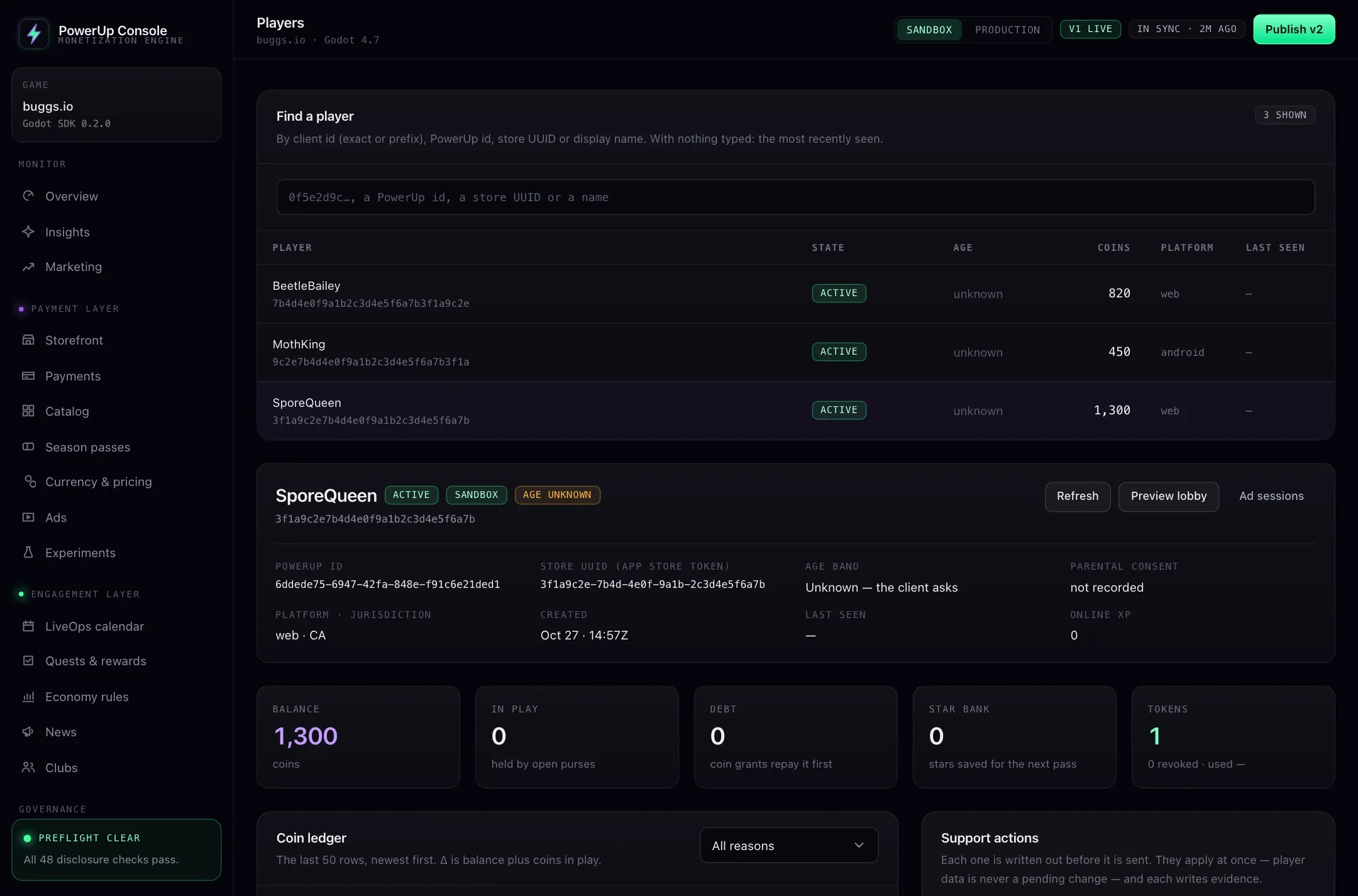
The console's Players page finds a player by client id (exact or prefix), PowerUp id, store UUID or display name, and shows their age band, consent, wallet, coin ledger, items and tokens. From there support can record or withdraw parental consent, set or clear the age band, revoke tokens for a lost device, verify an old account's owner, revoke a recovery code, grant an item, adjust coins, or delete the account. Every action is written to the game's audit trail.
When one of these calls fails, the code tells you why. The error reference lists each one with what to do about it.