A currency players can buy sits at the centre of many free-to-play stores, and it's easy to get wrong. This page covers Godot virtual currency from the ground up: hard and soft currencies, a coin wallet players can't edit, what happens on a refund, bundle sizes that leave no coins stuck, and showing what coins cost in real money. Most of it applies whatever you build on. Where PowerUp fits, we say so, and the in-game shop guide puts all of it on screen in GDScript.
Hard and soft currencies
A hard currency is one players can buy with money. A soft currency is only earned by playing. The difference matters because once money is involved, spending the currency is part of a purchase, and EU consumer authorities say it's covered by consumer law just like paying with real money.
Keep it to one hard currency if you can. The EU Consumer Protection Cooperation (CPC) Network's key principles on in-game virtual currencies (published 21 March 2025) list two things to avoid: mixing several purchasable currencies in one game, and making players go through several currency exchanges before they can buy anything. A game where gems buy coins and coins buy skins is much harder to price honestly than one where coins buy skins. The principles aren't a new law. They set out how the authorities apply existing EU consumer law: the Unfair Commercial Practices Directive and the Consumer Rights Directive.
In the PowerUp console you list your currencies and mark each one purchasable or earned only. A purchasable one needs a disclosed rate in US dollars before you can publish. buggs.io, our own game, has a single coin currency. PowerUp's season passes run on stars, a progress currency players earn from online matches, quests and events and can't buy.
A Godot coins wallet that keeps its own history
The simplest wallet is a number in a save file. It's also the easiest to edit, and it can't take anything back. A wallet you sell coins into needs three things:
- The server owns the balance. The game asks to spend coins. It never sets a balance.
- Every change is written down, with its reason and the balance after it, so support can answer "where did my coins go?"
- Refunds can reach it. When a store refunds a purchase, the coins it gave have to come back out.
PowerUp's wallet is a ledger. Every change to a player's coins is one row: a purchase, an item bought, a quest reward, a support adjustment. The rows always add up to the balance, plus coins held for a match in progress, minus any debt. Each write locks the player's wallet first, so two taps on Buy can't spend the same coins twice, and every request that spends or grants coins carries a retry key, so a request sent twice still counts once.
A coin purchase also states the price the player saw. If you changed the price in the meantime, the server refuses rather than charging a different amount, and the game shows the new price:
PowerUp.wallet_changed.connect(func(wallet: Dictionary) -> void:
    %Balance.text = PowerUpDisclosure.thousands(int(wallet.coins.balance))
)

var result: Dictionary = await PowerUp.buy_item("skin_gold", 300)   # the price on screen
if not result.ok and result.code == "price_changed":
    _ask_again(int(result.details.priceCoins))                       # the price now
Refunds go into debt, not free coins
This is the case homemade wallets often miss. A player buys 1,500 coins, spends 1,400 of them on a skin, then gets a refund from the store. If the refund only removes what's left, the skin was free.
PowerUp takes back exactly what the purchase granted. The skin stays, but the balance drops to zero and the other 1,400 coins become debt. While a wallet owes coins, spending is refused, and coins the player earns pay the debt off first. If the refund is undone later (a chargeback you win, say), the coins come back. The page on in-app purchases explains how store refunds reach the wallet.
Coin bundles and price ladders without stranded coins
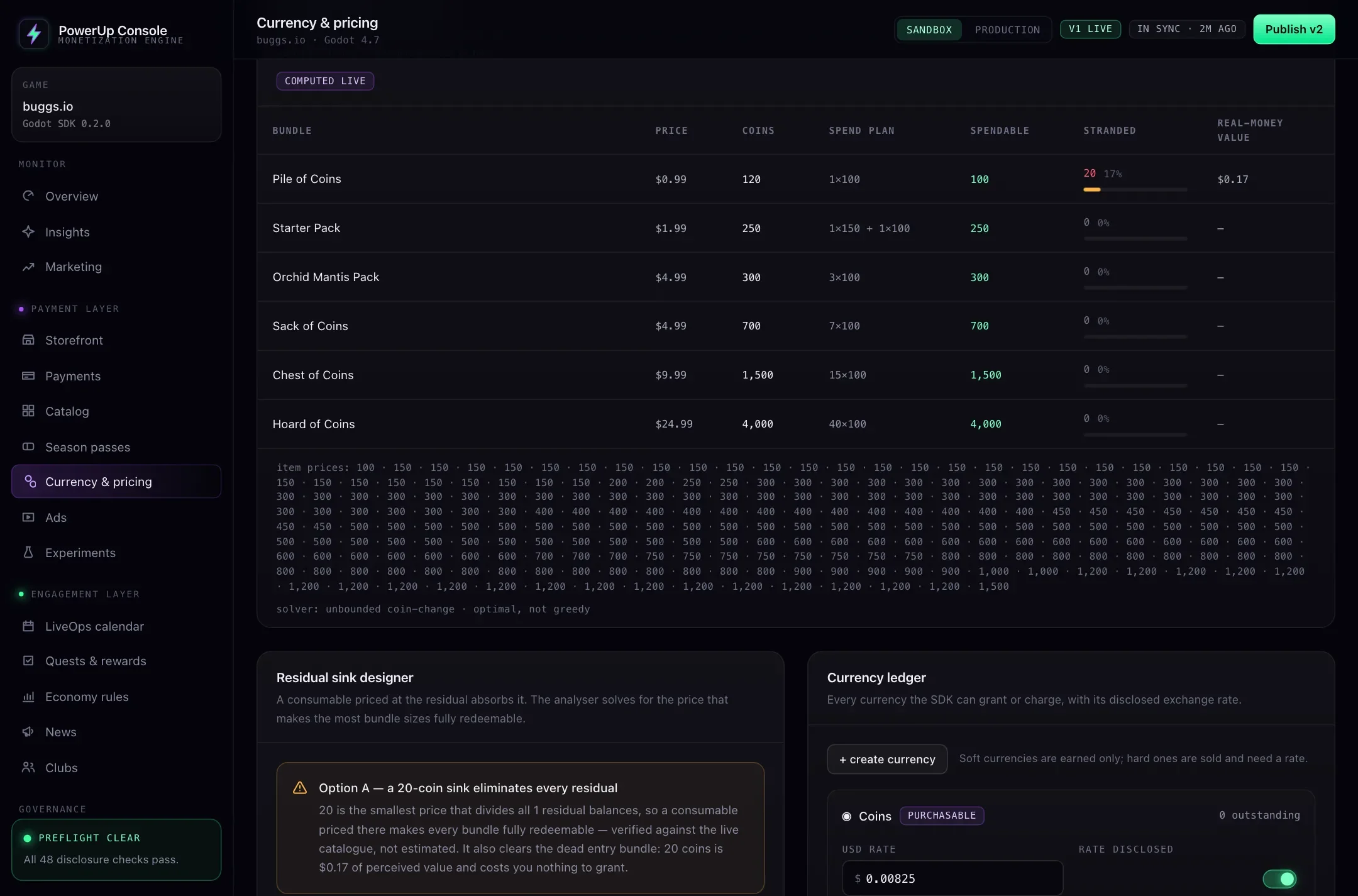
A stranded balance is coins a player can't spend, because no combination of item prices adds up to what's left. Sell 120 coins when the cheapest item costs 100, and every purchase of that bundle leaves 20 coins sitting there until the player buys again. The EU key principles count this as a way of forcing players to buy currency they don't want, and list currency sold "only in bundles mismatching the value" of what it buys among the practices to avoid.
A few rules of thumb, whatever engine or backend you use:
- Put item prices on a common step (50, 100, 150…) and size bundles on the same step.
- Make sure the cheapest bundle buys at least one thing.
- Keep a cheap consumable around that soaks up leftovers.
- Redo the maths whenever you add an item or change a price. A new price can strand coins in a bundle that was fine yesterday.
PowerUp does that last part for you, against the items actually on sale. For each coin bundle it works out the most a player can spend exactly (it solves the coin-change problem properly, rather than buying the biggest item first), what's left over, and what the leftover is worth in real money. Then it suggests fixes: a consumable priced so that buying it a few times uses up every leftover, and bundle sizes that land exactly. If your cheapest bundle can't buy a single item sold for coins, publishing fails until you fix it.
Real-money prices beside coin prices
Coins hide prices. "750 coins" means little until a player works out what 750 coins cost, and regulators have noticed:
- The EU key principles say that when content is sold for a currency players can buy, its real-money price should be shown too, worked out at the full price, without bulk discounts.
- In January 2025 the FTC announced a $20 million settlement with HoYoverse, the maker of Genshin Impact. Among other things, the proposed order, which the FTC said needed a federal judge's approval to take effect, requires HoYoverse to disclose exchange rates for its multi-tiered virtual currency.
PowerUp makes the rate part of your setup. A purchasable currency without a disclosed rate fails the publish
checks. Every offer that grants coins carries the rate, and the SDK's PowerUpDisclosure.currency_line() prints
the coins with their value beside them, like "120 coins (≈ $0.99)". Every wallet update carries the rate as well,
so your shop can put a dollar value next to an item's coin price. buggs.io's setup bases its rate on its smallest
bundle, 120 coins for $0.99, the price with no bulk discount.
Two more rules the SDK keeps for you: a value badge such as "1.2× value" only shows when the server checked it against a real baseline bundle that is live and sold on the player's platform, and a countdown only shows when the offer has a real end time.
Where PowerUp fits
PowerUp runs the currency side of a Godot game from one addon and one console: the wallet and its history, the coin bundles you sell through Stripe on web and desktop or the App Store and Google Play, items sold for coins, and the checks above. buggs.io runs its store and coin wallet on it today. The storefront docs list the calls, and EU rules on virtual currency goes through the regulation in more detail.
If you already run a general game backend, it may have a wallet too. As of October 2026, Nakama's user accounts include a server-side wallet that clients can only read, with a transaction ledger, and LootLocker's wallets update as players earn currency or spend it through its catalog, and can be credited or debited through its API or web console. PowerUp's wallet comes with the store around it: checkouts, refunds that reach the wallet, the stranded-coin maths and the publish checks. Godot backends compared has the wider picture.
PowerUp checks your setup against the rules built into it. That isn't legal advice, and your game's compliance is still up to you.