LiveOps for indie games is mostly about one question: why would a player open your game again tomorrow? Big studios answer it with a team that runs events every week. A small team needs the same parts (a calendar, quests, rewards, a way to talk to players) without building a backend for each one. This page covers what those parts are, how to run them without wearing out your players, and how PowerUp gives a Godot game all of them from one addon and one console.
Start small, and count on the server
You don't need everything on day one. Daily quests and an in-game news inbox are the cheapest LiveOps you can run: they need no new art, and they give players a small reason to come back. Events take content, so plan them on a calendar you can actually keep up with. Clubs only work once you have enough players to fill them.
Whatever you run, a few rules save you trouble later:
- Count play on a server you trust. If the client says "I got 10 kills", anyone can say it. Quests and rewards counted from results your own server reports can't be faked by editing the client, as long as the server is the one deciding who got the kill.
- Reset on a clock you control. Daily and weekly resets should follow one time zone you choose, on the server's clock, not the player's phone.
- Cap what play can earn. A per-match and per-day cap on coins keeps your economy from inflating when someone finds a fast farm.
- Never let a missed day take something away. A reward a player earned should reach them even if they forget to tap Claim.
What PowerUp gives you
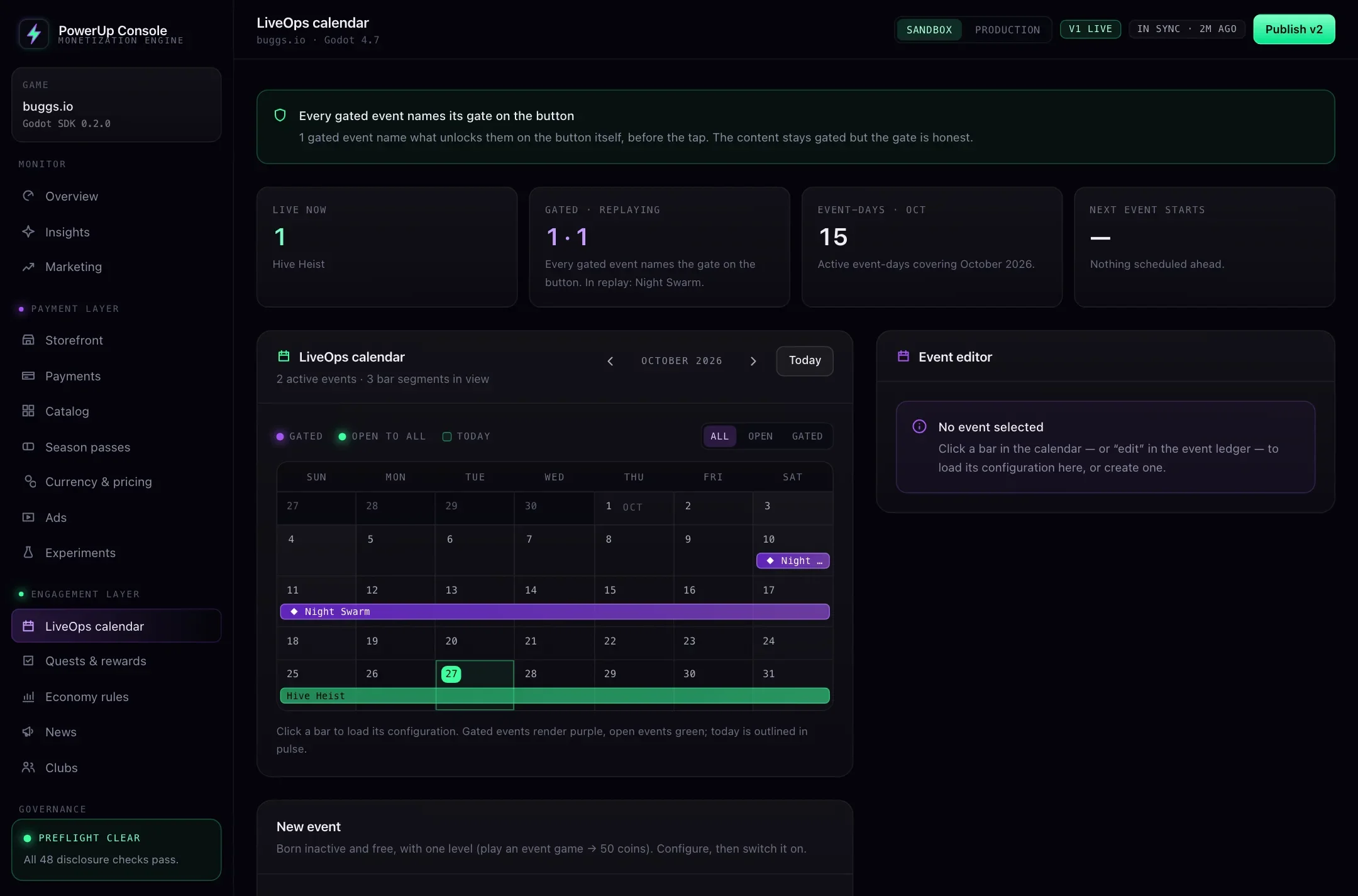
An events calendar
Plan events on a calendar and click one to edit it. An event can be open to everyone, only to subscribers, or only to players who bought a specific offer. A gated event names its gate on the button before the player taps it. Each event has up to ten reward levels, counted from matches played in that event, and you can keep it playable as a replay for a while after it ends.
Quests that count real play
Starter, daily, weekly, event and season quests. Starter quests come in pages that open one after another. Daily quests can rotate: write more than your daily slots and the server deals each player their own set of them each day. Season quests belong to the current season pass, and any quest can pay stars toward it. Quests can claim themselves or wait for a tap, and anything finished but unclaimed is added when the period ends.
Match rewards
Decide what a finished match pays. Coins can come from a base amount, kills, minutes played and a bonus by placement, with a multiplier per mode; stars from a base amount and kills. Matches shorter than a minimum you set pay nothing. Cap coins and stars per match and per day, and try the numbers in the console's calculator first. Coins land in the same coin wallet the store uses, with every coin written down.
An in-game news inbox
Patch notes, announcements, maintenance notices and gifts. Aim an item at everyone, only subscribers, or only players without a subscription, on the platforms you pick, inside a time window. Its button can open the store, the pass, an event, quests, clubs, the collection or an https link. A gift (coins or an item) is added once, the first time the player opens the item.
Clubs and a weekly tournament
Players create and join clubs. There's no chat. The only thing a player types is the club name, which is screened against a blocklist you control; descriptions come from presets you write, and players can report a club for you to hide or rename. Matches earn points for the player's club, and every Monday the week closes and reward brackets go out by rank, on their own, to members who joined before the week ended and scored at least the minimum you set. Nothing to claim, so nobody loses a reward by missing a day.
Badges that don't nag
The lobby badges (quests, pass, events, news, store, collection, clubs) only light up for something new since the player last looked, clear when the screen opens, and are capped so the lobby never shows more than you allow. A check warns if you allow more than three at once.
How play gets counted
Your game server sends PowerUp one report per finished online match, with its server key, which never ships inside the game. The report carries what happened: kills, time played, placement and how many players there were, the mode (unranked, ranked, party or event), and a few arena-game stats from buggs.io, such as peak size. Quests, event levels, match rewards, club points and season pass stars all come from that one report, and sending it twice still pays once.
That means LiveOps progress needs a game server. A single-player or peer-to-peer game with no server of its own can still use the news inbox, the store and the wallet, but its quests and events won't move.
The quest metrics come from those report fields today: games played, kills (in total or in one match), time played, top finishes, ranked, party and event games, plus buggs.io's own (peak size, food eaten, boost uses). Check the list against your game before you plan around it. If your matches don't fit, tell us on a demo.
In your Godot code
The client only reads and claims. Everything it shows comes from the server, already filtered for this player:
# lobby.gd: the LiveOps side of a lobby screen
func _refresh_lobby() -> void:
    var res: Dictionary = await PowerUp.fetch_home()
    if not res.ok:
        return
    %EventsTile.visible = res.home.surfaces.events   # no event live or in replay: hide the tile
    %ClubsTile.visible = res.home.surfaces.clubs
    %QuestsBadge.text = str(PowerUp.badge_count("quests"))

func _on_quests_opened() -> void:
    PowerUp.badges_seen("quests")   # badges clear when the screen opens
    var res: Dictionary = await PowerUp.fetch_quests()
    if not res.ok or res.quests.daily == null:
        return
    for quest: Dictionary in res.quests.daily.quests:
        var line := PowerUpDisclosure.quest_text(quest)   # "Get 7 kills in one game"
        if line != "":
            %DailyList.add_quest(quest, line)   # your UI

func _on_claim_pressed(quest: Dictionary) -> void:
    var res: Dictionary = await PowerUp.claim_quest(quest.key, quest.periodKey)
    if res.ok:
        _toast(PowerUpDisclosure.reward_text(res.claim.reward))   # your UI: "50 coins"

func _on_news_opened(item: Dictionary) -> void:
    var res: Dictionary = await PowerUp.read_news(item.key)
    if res.ok and res.read.gift != null:
        _toast(PowerUpDisclosure.news_gift_line(res.read.gift))   # "Gift added: +50 coins"
Countdowns run to an end date the server sent, on the server's clock, so changing the phone's clock changes nothing.
Checked before it ships
Events, quests, news and club settings are part of your config, so they go out the way everything else does: in a draft, through the publish checks, as a new version you can roll back. See remote config for Godot for how that works. A few of the automatic checks are about LiveOps:
- event levels run in order and pay real rewards, and a gated event says what opens it
- quests count a metric that exists toward a reward that exists
- no quest pays players for turning on notifications
- a warning when a quest rewards time played and isn't switched off for younger players
- a warning when a daily cap on match rewards is zero, or more than 20 matches' worth
- club prizes exist and their rank brackets don't overlap
- a warning when a news gift doesn't exist or a link isn't https
- the game's time zone is a real one, since every reset depends on it
What runs on buggs.io today
buggs.io is our own game, made by the team that builds PowerUp. Its live setup runs the store and coin wallet, the item collection and its unlock rules, accounts, and online progress from the same match reports described above. Events, quests, news and clubs are built into its client but aren't switched on there yet, so we show them on the demo setup instead. The buggs.io case study has the details.