Remote config lets you change a value in a game that's already shipped, without a new build or a store review. For a Godot game that usually starts as a JSON file on a server. This page shows that simple version in GDScript, explains where it stops being enough (prices and rewards), and covers how PowerUp handles remote config for Godot: every price, offer and LiveOps setting lives in a draft, gets checked, and only reaches players once you publish it.
The do-it-yourself version
For tuning values that don't cost anyone money, a hosted JSON file works fine. This autoload loads the last copy it saved, asks for a fresh one, and falls back to defaults when the network is down:
# remote_config.gd: add it as an autoload
extends Node

const URL := "https://example.com/config.json"
const CACHE := "user://remote_config.json"

var values := {"enemy_speed": 1.0, "daily_bonus": 50}

func _ready() -> void:
    _load(FileAccess.get_file_as_string(CACHE) if FileAccess.file_exists(CACHE) else "")
    var http := HTTPRequest.new()
    http.timeout = 5.0
    add_child(http)
    http.request_completed.connect(_on_done.bind(http))
    http.request(URL)

func _on_done(result: int, code: int, _headers: PackedStringArray, body: PackedByteArray, http: HTTPRequest) -> void:
    http.queue_free()
    if result != HTTPRequest.RESULT_SUCCESS or code != 200:
        return   # keep the cached or default values
    var text := body.get_string_from_utf8()
    if _load(text):
        var file := FileAccess.open(CACHE, FileAccess.WRITE)
        if file:
            file.store_string(text)

func _load(text: String) -> bool:
    var parsed: Variant = JSON.parse_string(text) if text != "" else null
    if parsed is Dictionary:
        values.merge(parsed, true)
        return true
    return false
A few things to know. JSON numbers come back as floats, so wrap counts in int(). Anything that read a
value before the fetch finished keeps the old one, so read values when you need them, or emit a signal
when the fetch lands. And on a web export the request is a browser fetch, so the server hosting the
file has to allow your game's origin (CORS).
Where a JSON file stops being enough
The trouble starts when the value is a price or a reward. A file tells the client what to show, but the client can't be trusted to charge it: whatever decides what a purchase costs and what it grants has to run on a server. Then come the questions a file can't answer. Did that edit just break the store? What did players have yesterday, and how do you get it back? What does a player on last month's build see when you add an item it can't draw?
How PowerUp does it
What counts as config
In PowerUp, everything your store and LiveOps run on is config: prices and coin amounts, sale windows and platforms, store items and their unlock rules, your coins and their dollar rate, season passes, quests, events, match rewards, ad placements and their pacing, news, clubs, and the parameters you define for each boost (a number with a minimum and maximum, or a list of choices). The server decides every purchase and reward from it, so a player can't edit the price they pay.
Draft, check, publish
Every edit in the console goes into a draft and is logged. When you publish, 48 automated checks run on the draft first (49 with Stripe Managed Payments). If one fails, nothing ships and the console shows which check and why. Warnings don't block. A publish that leaves owners of an item unable to use it in new builds also asks you for a note. The publish checks page lists what they cover.
Players only get published versions
Each publish freezes the draft as a numbered version. Players are served that version and nothing else, so a half-finished edit never leaks. Every answer the game gets says which version it came from, which helps when a player reports something odd. Your game server reads its own slice of the config, such as event times and boost parameters. It can ask every minute, and the answer is a quick "nothing new" until you publish again.
If a player has the shop open while you change an item's coin price, a buy at the old price is refused with the new price, and no coins are taken.
Compare versions and roll back
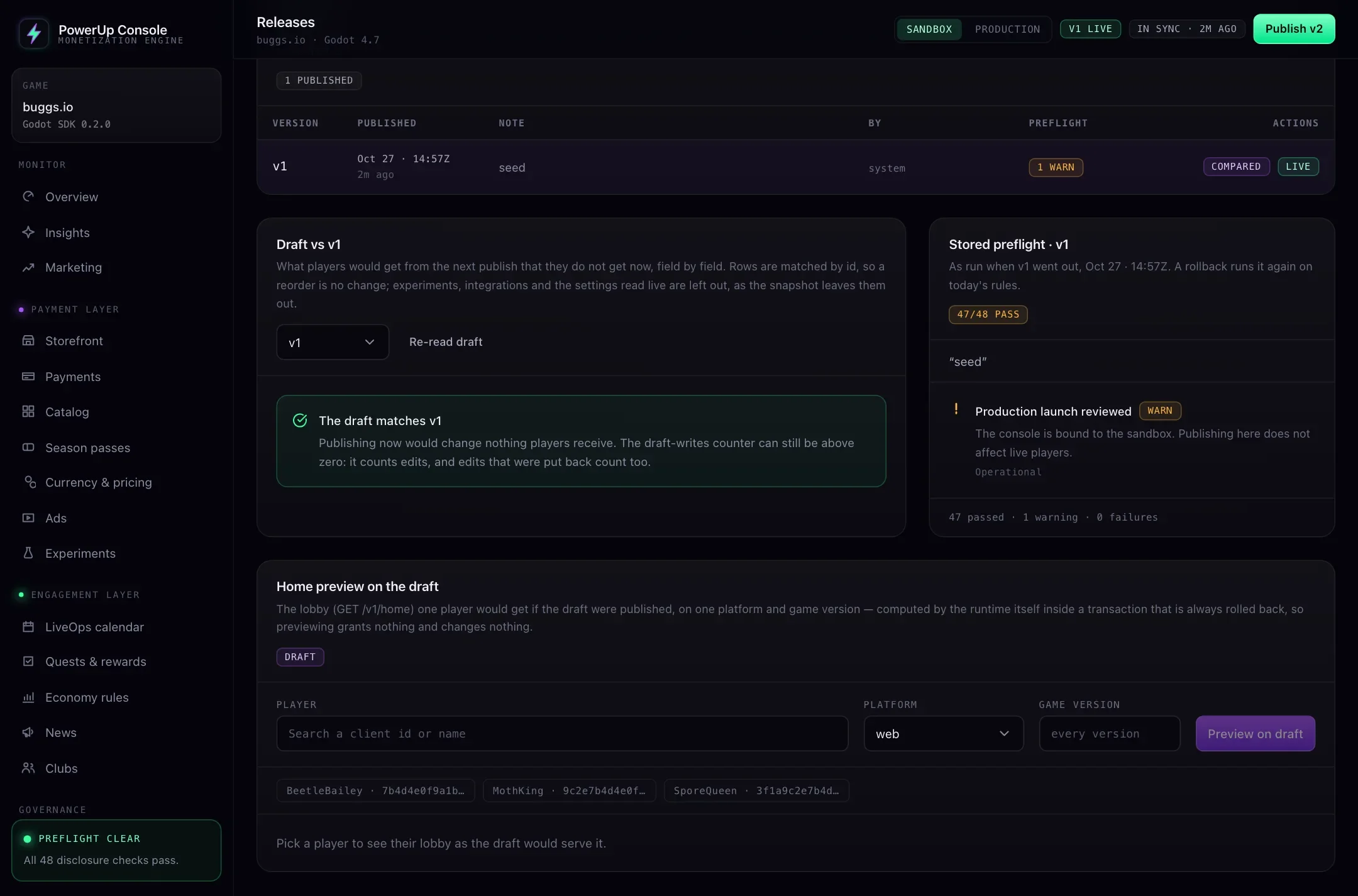
The Releases page lists every version with its note, who published it, and the checks as they ran that day. Pick any version to compare the draft with it, section by section and field by field. Rolling back republishes an older version as a new one after running today's checks on it, and leaves your draft as it was. If the version you return to asks more XP for an item, or stops giving it away free, players who had already reached it keep it.
Target game builds
Items carry version rules: an exact version, "1.4 and later", "up to 1.6", a range, or exclusions. The Godot SDK sends the build's version with every request (by default from your project's version setting), and each build only gets the items and offers it can use. Checks warn when a subscription, pass or featured offer grants something some builds can't use, because those builds would never see the offer.
Preview before you publish
The console can show the lobby a real player would get from the draft, on one platform and one game version. It runs the real server logic and then throws the result away, so a preview grants nothing. Test builds on a sandbox key can also play the draft directly.
In your Godot code
const PLAY_DRAFT := false   # true only in a test build on your sandbox key

func _ready() -> void:
    PowerUp.initialize("YOUR_PUBLISHABLE_KEY", save.client_id, {
        "baseUrl": API_URL,
        "appVersion": "1.4.2",   # leave it out to use application/config/version
        "draftConfig": PLAY_DRAFT,
    })

func _on_buy_pressed(item: Dictionary) -> void:
    var res: Dictionary = await PowerUp.buy_item(item.key, int(item.price.coins))
    if res.ok:
        return
    match res.code:
        "price_changed":   # you published a new price; nothing was charged
            _confirm_new_price(item, int(res.details.priceCoins))
        "update_required":   # this build can't use the item
            _toast("Update the game to get this.")   # your UI
Experiments: what's there and what isn't
The console has an experiments register: the change you want to test, what you expect, the metric you'll judge it by, and a guardrail metric that would make you stop. If you mark an unfinished experiment as past its guardrail, a check warns at every publish until you clear the flag or complete the experiment. What it doesn't do yet is split players into groups. Nothing is served to some players and not others, so today you test a price by changing it for everyone and comparing periods. If live A/B assignment matters to you now, a tool built for it is the better choice.
Other options for Godot
As of October 2026, Talo's live config sends key-value properties from its dashboard to a Godot game, keeps an offline copy for when the player has no connection, and fires a signal over its socket when a value changes, so a running game picks it up. Heroic Labs' Satori Godot client offers feature flags, experiments and live events for Godot 4. Both are general tools for any value, and Satori runs experiments in a live game, which PowerUp doesn't yet. PowerUp is narrower: it runs the store, the wallet and LiveOps themselves, and checks the config they run on. See PowerUp and Talo and the Godot backends comparison, and LiveOps for Godot games for what the events, quests and news inbox do.