Godot web payments are simpler than they sound. If your game runs in a browser or on desktop, a player can pay on Stripe's hosted checkout page, and your game only has to open that page and find out the result. PowerUp builds this in: the addon starts a Stripe Checkout from GDScript, PowerUp creates the session with your own Stripe account, and the purchase lands in the same coin wallet as App Store and Google Play purchases. Here's how it works, which builds it fits, how tax works and what you set up.
How Stripe Checkout works in a Godot game
Stripe Checkout is a payment page that Stripe hosts, so card details never pass through your game. A web purchase takes five steps:
- The player opens an offer. The game asks PowerUp for a checkout session right away, before the player taps Pay.
- PowerUp runs its checks and creates a Stripe Checkout Session with your Stripe key.
- The player taps Pay and the game opens Stripe's page: a new browser tab on the web, the system browser on desktop.
- Stripe confirms the payment to PowerUp with a signed webhook, and PowerUp grants the coins, items, pass or subscription.
- The game asks for the result every few seconds, and at once when the player comes back. The wallet updates on its own.
The order matters on the web. Browsers only let a page open a new tab while it's handling the click itself, so a game that waits on the network after the tap gets its tab blocked. The Stripe checkout guide for Godot walks through the timing with code, including the fallback for when a browser blocks the tab anyway.
Which builds it's for
| Build | How the player pays | What to know |
|---|---|---|
| Web export | Stripe Checkout in a new tab, or in the same tab | Use a single-threaded export and list your web addresses in the console |
| Desktop (Windows, macOS, Linux) | Stripe Checkout in the system browser | The browser lands on a short "payment received" page, and the game picks up the result |
| iOS | The App Store | StoreKit 2, with every transaction checked on the server |
| Android | Google Play | Play Billing, with purchases acknowledged for you |
You price a product once in the console, and each platform gets the checkout it's allowed to use. In-app purchases on iOS and Android covers the store side.
Tax: Stripe Managed Payments as merchant of record
Selling on the web makes you the seller, with sales tax, VAT and GST to collect and pay. App stores do this for you because they're the merchant of record. On the web, you can hand it to Stripe.
Stripe Managed Payments makes Stripe the merchant of record for your digital sales. As of October 2026, Stripe's documentation says it collects and remits sales tax, VAT and GST in more than 80 countries, screens for fraud and handles disputes. Receipts come from Link, Stripe's one-click checkout, and buyers see the purchase as "Sold through Link". Stripe's pricing page lists it at 3.5% per transaction on top of the usual payment fees (2.9% + 30¢ for a domestic US card). It's open to businesses based in the countries Stripe lists, after an eligibility review, and video games are an eligible category.
In PowerUp, it's a switch per game under Payments → Stripe:
- Sync the catalog first. The catalog sync on the Stripe card shows a preview, then creates a Stripe Product and Price for each web and desktop product, with one of Stripe's video game tax codes. The tax classification is yours to confirm.
- One more publish check. With Managed Payments on, the publish checks go from 48 to 49, and a web or desktop product without a Stripe price can't be published.
- Update your legal pages. Your terms, refund policy and privacy policy should say web purchases are sold through Link, with Stripe as the seller.
By default the sync makes tax-inclusive prices, so the price on the card is what the player pays. If you set prices with tax added on top instead, PowerUp still records the list price, so the tax never counts as revenue or toward a teen's spending limit.
One wallet across Stripe, the App Store and Google Play
Every payment, from any of the three checkouts, goes through one place in PowerUp that turns it into a purchase, a wallet balance and the items it grants.
- Coins bought on the web are the same coins a player spends on their phone, and a transfer code moves the wallet to a new device.
- A refund from any checkout takes back exactly what the purchase gave. If the coins are spent, the wallet goes into debt instead of leaving free coins behind.
- Stripe and the stores retry their messages. Each one is recorded once, so a retry can't grant twice.
- The checkout grants what the product granted when the price was shown, even if you publish a change while the player is paying.
- Web subscribers cancel through Stripe's billing portal. The game fetches a fresh portal link and opens it when the player taps Manage.
The coins and shop page has more on the wallet.
What gets checked before a player pays
Checks run when the checkout is created, not after the money moves. PowerUp refuses a checkout, with a code the game can act on, when the player hasn't given their age, a child has no parental consent, a child or teen would go over their monthly spending limit, the product isn't on sale on this platform right now, or the player already owns it or has hit its purchase limit. A session lasts 30 minutes, and reopening the same product within 20 minutes hands back the open one.
Setting it up
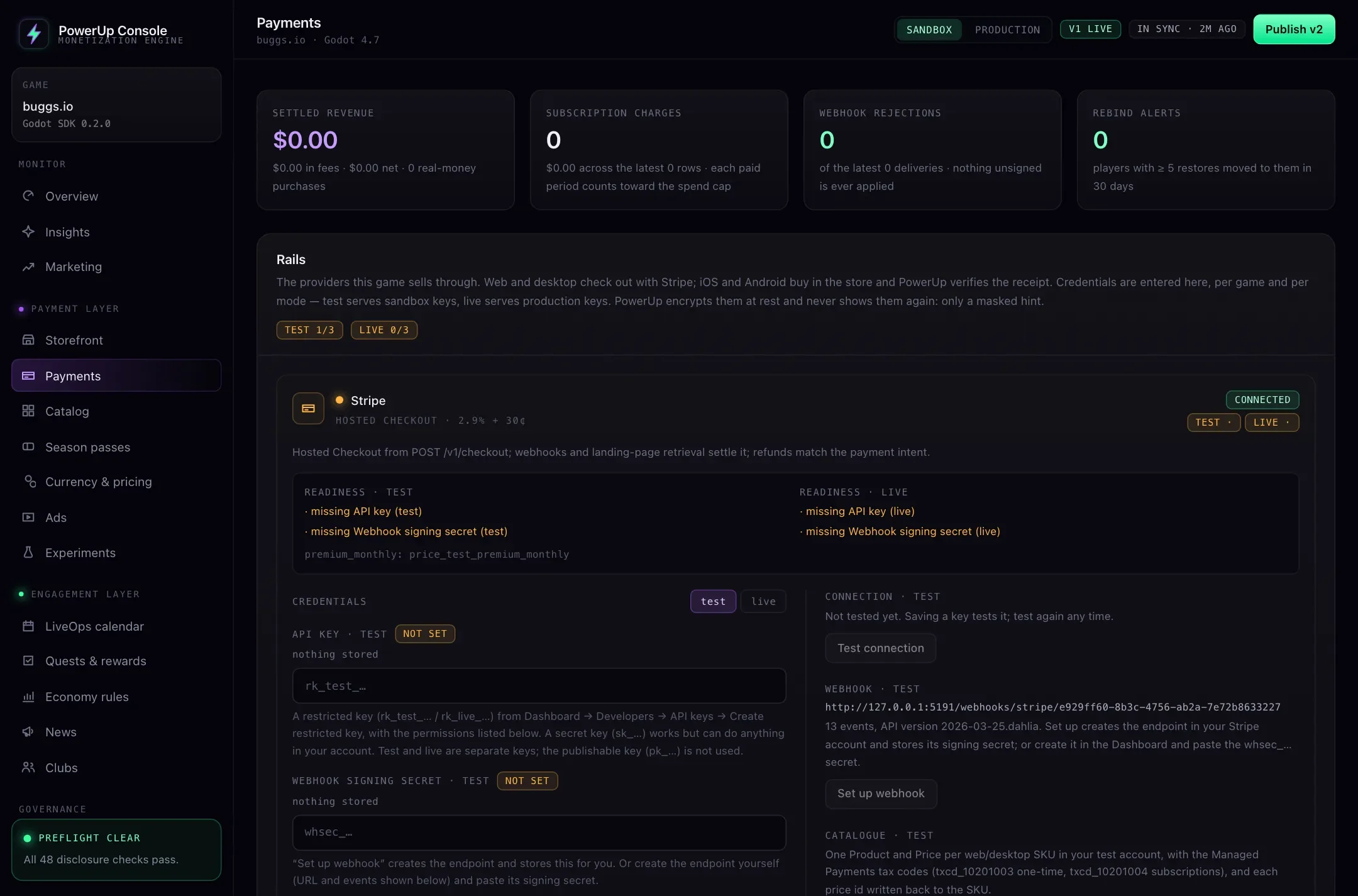
- Connect Stripe. Under Payments → Stripe, paste a restricted key for test mode, then one for live. "Set up webhook" creates the endpoint in your Stripe account. Keys are encrypted, and the console only ever shows a masked hint of them.
- Price your products in the storefront and pick their platforms. Web and desktop use Stripe.
- List your web addresses under Integrations, so Stripe can send players back to your game.
- Wire up the game. Call
start_checkout()when an offer opens,open_checkout()in the Pay handler andcheckout_status()until it completes. The Godot Stripe checkout guide has the code.
Is web checkout worth it?
It depends on how much you'd move and what you pay now. Store fees mostly run from 15% under small-business programs to 30%, against 2.9% + 30¢ for a US card on Stripe, plus 3.5% with Managed Payments. The fixed 30¢ hurts small purchases: on a $0.99 coin pack, Stripe's fee comes to about 33¢, a third of the price. Sell bigger bundles on the web.
Try your own numbers in the web checkout fee calculator, and read web checkout for mobile games for what Apple and Google allow on phones as of October 2026. PowerUp's own fee is separate from Stripe's and the stores': see pricing.